OTHER HOT: Technology

LifeStyle Healthy Couple Tips Technology Way of Life

Breaking News
Loading...
Showing posts with label Technology. Show all posts

Tricks stopped on a hill with a half-clutch

Drive in the city or on the streets will not reveal the flat of your expertise in driving. Your driving skills will be tested when you take the car out of the city. Moreover, through the mountains and valleys and twists like a snake.

Usually the driver for the first time to face this kind of terrain will suffer nervous, so that when there is a queue at the ramp, the car will reverse and crashed into other vehicles behind him at risk

Stopped on a hill is actually not something difficult. Provided you're not too nervous and understand the technique. One way other than using the hand brake is half-coupling technique.

Way this is done if the circumstances are quite short in the rise and will soon be running again. Generally used for uphill road is not too high as the home garage. The trick is to combine the function of gas and also a function of the coupling.


The first step, when it is in the middle of the ramp, stop the car's speed, lower porsneling with the clutch at the same time hold the gas. Gas compressed should not be too deep, but it also should not be too small. Must be fitted, so that the car can be stopped completely.

If you want to move forward again, off the clutch pedal slowly and setimbangkan by adding the gas pressure. After that, the car will go forward slowly, depending on the clutch and the gas control you.

How to make money on YouTube

One of the most visited websites in the world is YouTube. Users download a huge number of clips on the service, not even knowing how to make money on YouTube.

Make money on YouTube helps special affiliate program. To become a partner of this program, you must fit the following requirements:
  • you should do a unique and high-quality video;
  • you must be the owner of all audio and video content that is downloaded to the site;
  • you must be an active user of the service and upload the video to it regularly (about one video a week);
  • You must be at least 1,000 subscribers (subscribers)
  • each of your video must be no less than 1,000 views.

If you meet all the requirements, and still do not know how to make money on YouTube, read on.
  1. The first thing you need - to create video with a video camera or mobile phone.
  2. Second - registration on YouTube and download your video there. If you also have your own personal website, then a video, you can leave a link to it and additionally earn a contextual advertising.
  3. After downloading videos 10-20, you can apply for an affiliate program youtube.
  4. After the filing of the application need to wait for some time. Its review may take a few weeks to several months.
  5. After approval of your candidacy begins transfer of funds to an account. The fees will depend on many factors: the subject of video, number of views, etc.

YouTube pays 50% of revenue from advertising, located on your video. We calculate the approximate probability fees. If 1000 views 10 people clicked on the ad cost $ 0.6, the price will be $ 6 clicks.After that YouTube would be getting 50%, and you will be credited with $ 3. These are rough estimates, since not every click is worth $ 0.6. Prices range from $ 0.05 to $ 1.

If you have created a good video channel, you can receive more than 70% from advertising on YouTube. To do this you need to create an affiliate program WSP.

Be alert 9 Deception, Applications and Video in Social Media

According to the study released Webcertain Group, the number of social media users in the Asia-Pacific region, including Indonesia, in which is expected to reach 1 billion by the end of the year, or nearly five times the number of social media users in North America.

This makes social media as a means favorite cyber criminals to attack. There are many modes used cyber criminals to spread viruses to PCs and smartphones, or steal personal information by luring users to click on a fake site.

Computing security company Trend Micro claims to have revealed nine methods of deception in social media that is currently flourishing in social media.

"Fraud in the increasingly popular social media. They lure users to install specific applications through social media posts or tricking the user to click on sites that cause a virus or malware infection," said Terrence Tang, Senior Director of Consumer Business, Asia Pacific, Trend Micro in a press release .

He continued, "Users are advised to be wary when they are surfing the internet. Always check source link and posted applications, social media change the password regularly, and use applications that offer privacy protection, such as Trend Micro Dr. Safety."


For more details, here are nine modes of fraud in today's social media are emerging:

1. Application Facebook Color Changer

This application is interesting because it offers a feature to change the color of your Facebook page. This application will redirect users to fake websites and trick them to share the app with friends, including the use of video tutorials to trick users into clicking on ads. These applications can hijack a user's profile and the profile of his friends, and even infect the mobile device with the virus.

2. Application Who Viewed Your Facebook Profile

This application allows you to check who sees your Facebook profile. Once clicked, the user profile and social network you will immediately be exposed to a scammer.

3. Video up with an interesting title and striking

Cyber ​​criminals in cyberspace often use interesting and provocative titles like "Not Safe for Work" or "Outrageous" to the more intrigued users to click on a video that actually directs them to a fake website and aim to steal personal information. Fraud can also cause infection to the user device, such as Rootkits are difficult to remove.

4. Video Naked on Facebook

Facebook scams that contain nude videos usually come in the form of advertising or posting with a link that directs the user to a fake YouTube site. Fake site then prompts the user to install the updater to fix Adobe Flash Player they are "broken". Once clicked, the fake Flash Player installer will infect the device by installing malware (Trojans typically) as a browser plugin.

5. Application InstLikeapp on Instagram

Thousands of users worldwide have installed the application InstLike hoping to increase followers and "buff" their Instagram profile. Unfortunately, this application turns out to steal passwords and other personal information. Although a number of reports of fraud methods have been published, there are still many users who unwittingly cheated, because InstLike still circulating freely in the app store.

6. Application Instant Twitter Followers

Applications that promises more Twitter followers instantly usually causes users become victims of scammers, affecting even the user's account with a virus attack.

7. Fraud by Twitter Feed

Some scams send messages like "I just saw your picture is" to trick users into clicking on a malicious link in a message box. Scammers can hijack Twitter user accounts and send spam messages to their friends, direct them to websites that can steal personal information.

8. The Dating Game on Tumblr

This spurious feature in his message has captivated many users to click on a link and make a date account, which will then take them to a page or pages adult ads that generate revenue for the scammers.

9. Posting Fake on Pinterest

Pinterest false offers of free gifts to lure users to fake survey sites or phishing sites. The application also sends spam to their followers to expand their attacks.

How your personal information is at risk : Data leaks

THE personal data you entrust to companies is at greater risk than you realise; and for businesses in today’s hi-tech world, it’s not a question of if this information will be breached, but when.

That’s the view of UK technology expert Guy Bunker, who says recent cyber attacks overseas should serve as a wake-up call for Australia.

Personal information of up to 750,000 Japan Airlines (JAL) customers was leaked last week due to a cyber attack. This followed the celebrity nude photo leak from earlier this month, where explicit photos showing more than 100 female stars, including Jennifer Lawrence, hit the internet.

The head of Australia’s corporate regulator has also warned that Australian businesses are not taking the risk of cyber crime seriously enough . In March, Australian Securities and Investments Commission chairman Greg Medcalf said each attack in Australia cost $2 million and that cyber crime had the potential to be the next “black swan event”.

Dr Bunker, the chief technology officer of information security company Clearswift, believes Australia is behind the rest of the world in protecting customers’ sensitive information — and says data breaches are much more common than what is disclosed.

Australia is five to 10 years behind the US and UK in protecting customer data.

“In the UK, America and Europe, we’ve been hardened,” Dr Bunker said. “In general, organisations are better prepared through a huge number of small attacks.”

Australian customers are more vulnerable because we lack specific laws to protect privacy. The Australian Law Reform Commission has recommended that it be mandatory for companies to notify affected individuals in the event of a data breach , but there is no legal obligation to do so.

“Australia is behind the curve, not least because of privacy laws. Those laws drive the adoption of security. The threat is no greater (in Australia), but because of the lack of privacy laws, you are more vulnerable,” Dr Bunker said.

It’s not clear if bank account or credit card information was compromised in the JAL attack, but Dr Bunker said hackers getting a hold of other customer details could be just as dangerous.

“They weren’t able to siphon off credit card information but that’s almost by the by because the cyber criminals are after other information: names, addresses, email addresses, birthdays — enough stuff to create a perfectly tailored phishing email,” Dr Bunker said.

Instead of seeking bank details directly, which are often better protected, hackers can use the other information companies have to create an email masquerading as a trustworthy business and entice the customer to enter their credit card number with an attractive offer.

“They know where you live, they know everything about you, so they create an email that says ‘You get a special discount if you book through this website’ and, bang, they’ve got your credit card number,” Dr Bunker said.

Companies also store information that commonly forms the answers to questions required when resetting online banking passwords, such as birth dates and maiden names, which is also highly valuable to fraudsters.

“That’s where the real threat comes from,” Dr Bunker said.

In Australia, employees are most likely to be the source of data security breaches, with Clearswift research showing they are the culprits in 44 per cent of cases.

Twenty per cent of Australian organisations claim ex-employees are a source and 21 per cent blame customers, partners or suppliers.

And Dr Bunker has some frank advice for Australian companies on the need for cyber crime vigilance.

“First thing is, it’s not about if you are going to be breached, but when. And it’s often not if or when its happened, but when you find out — because it’s happening right now,” he said.

“It doesn’t matter how big or small you are, your data is of use to someone.”

He said companies’ reputations could be protected if they put in place proper safeguards, such as data-loss prevention systems, which allow sensitive data to be removed before the information leaves the organisation. If JAL has a system like this in place, the incident wouldn’t have occurred.

“If you’ve got a malicious insider, or ‘the enemy within’, you need systems in place that watch for information being used and abused, and travelling outside the organisation.”

He said breaches could also occur inadvertently, through holes in company systems. Common mistakes can be workers printing out sensitive customer information, burning unencrypted data on CDs or not being careful enough with the details contained in emails.

“That inadvertent stuff happens a lot. It’s not just cyber attacks. JAL is a good wake-up call that those systems need to be checked out so the processes around them is secure and protected,” Dr Bunker said.

“Ask the people at the sharp end, do they know of any practices that might put information at risk?”

He said customers needed to be equally aware of the risks. The general public could learn from the celebrity nude photo hacking scandal, because it’s not just the picture itself that can be valuable, but the metadata contained in the image.

“In this particular case, it’s not about the obvious; it’s the other data. With the celebrity selfies, it’s really embarrassing to have a photo of you naked, of course, but the metadata tells you exactly where the picture was taken and this can be just as dangerous, in the hands of the wrong people, such as a stalker.

“The first thing is to acknowledge that using the net can be secure but it can also be very insecure.

“This has to be taken seriously, because actually your info is of incredibly good use to the cyber attacker.” (news)

Howto use Hyperlapse Instagram's new app

Instagram just launched Hyperlapse, a super quick and easy way to make timelapse videos with your phone. It's an exemplar of simplicity, allowing even the shakiest of individuals access to smoothed out video in a flash.

Apps don't come much more minimal than this. There are literally only two screens making up the entire experience. The first is your camera view, with nothing but a big record button in the center. Press it and off you go on your video journey.

The entire user interface of Hyperlapse

The screen will tell you how much time you've recorded, and the idea is to record long stretches of video, much more than you normally would to show your friends. You can record an entire sunset if you want, provided you have enough storage space on your phone.


When you finish the recording, Hyperlapse brings you to another super simple interface which lets you select your video's playback speed. You can ramp it up all the way to 12x it's original speed. The flexibility in this department is essential to the experience, because every type of recording merits a different playback speed to really make it sing. It's just like selecting a filter in Instagram-it depends on your own sensibility.

From there it's simply a matter of either saving your Hyperlapse to your camera roll or sending it right on over to Facebook or Instagram, where you can add filters and give it the ol' square format treatment. That is entirely it! The resulting videos are very low resolution, like, really only suitable for viewing on your phone. But that's the point. Apps like this are about the share-ability, not the image quality.

No sound is recorded, which makes sense, but it would be nice to have the option to add a soundtrack. For that you'll have to import your video into a separate app. There are also no filters built into Hyperlapse; you can send your video to Instagram to gussy it up, though

Hyperlapse is simple, but it does have the potential to spur creativity in interesting ways, much like how Vine did after its release. Experimentation will occur that will stretch the limits of what a Hyperlapse video can be. But even in its most basic form, the app provides what amateur video desperately needs, an effortless way to make things look good. It feels great to not have to worry about holding your camera absolutely still, and will definitely make video recording feel cooler and easier to handle. (toi)

New Smartphones Create a Bulge Problem

In the past, such problems were limited to hipsters with curly mustaches, whose jeans were so skinny they might actually be cellophane wrap. But now mere mortals with normal pants and purses are in despair.

Over the weekend people bravely took to the public complaint box, Twitter and Facebook, to grumble about this oversized issue. (Pun intended.)

"My new iPhone 6 doesn't fit into the pocket of my Lululemons," Sarah Watson wrote on Twitter.

"I capitulate. The iPhone 6 Plus simply won't fit comfortably in my not-at-all skinny jeans," David Heinemeier Hansson lamented. He added, with a sad emoji face, that he was "downgrading" to the iPhone 6. And an in-depth thread popped up on Reddit discussing how to get around this problem.

Technology blogs have tried to help. Dozens of videos have appeared on YouTube offering expert tests of iPhones slipping in and out of random pockets. (No, I'm not kidding.) A number of downloadable guides allow users to print out a fake iPhone 6 and 6 Plus to see if they will fit in your clothing. (Again, I'm not kidding.) It won't be long before a Silicon Valley start-up gets $10 million in funding for an app that tells people which iPhones will fit in which jeans. (This time I am kidding — I hope.) 

While it's easy to joke about this being a non-problem, this is actually a bit of a real issue, given that the smartphone is arguably the most important gadget in our lives today, and one that is usually just inches away from us.

Among gadget reviewers, women seemed to have the most trouble with the new iPhones. Lauren Goode of Re/code said the larger model was too big to hold in her hands or wear on her arm while exercising. My colleague Molly Wood, a columnist for The New York Times, told me that the iPhone 6 Plus won't fit into her purse. And Abby Johnston of Bustle noted that because women's jean pockets are smaller than men's, either pockets have to get bigger, or phones smaller.

But don't expect either of those to change anytime soon. I called around to dozens of jean makers and designers, and heard a lot of noes when asked if companies planned to change the style or aesthetic of their clothing to accommodate bigger phones.

"Our skinny-jean pockets are too small for the new iPhone," said Katrina Klein, denim director for Rag & Bone, adding that she has no plans to change that. "We expect people to carry their larger phones in bags and purses."

Lela Tillem Becker, a founder of Mother, a high-end clothing designer, said that the iPhone 6 and 6 Plus fit in the rear pocket of the company's jeans, but they too won't make accommodations for the front pockets. "If it disrupts the shape, it's just not worth it," she said.

But fear not, men of Silicon Valley. Some guy-centric brands seem to be fine forgoing form for techie function.

Last year Dockers announced that it had expanded its "coin pocket," which is the smaller pocket inside the larger pocket of men's pants, by an extra inch to accommodate larger phones. Bonobos, the online clothing store, now offers a jacket called the Jetsetter, which has a larger inside pocket that fits a passport or larger smartphone.

"If none of our pants fit the iPhones, that would be a real problem," said Dwight Fenton, vice president for design at Bonobos. "You ignore them at your own peril."

But how much bigger can pockets even get? Josue Perzell, store director of Denim Doctor, a Los Angeles-based vintage jean seller and repair shop, said that over the years, jean pockets had already grown drastically.

"Early vintage jeans tend to have much smaller pockets because people didn't have much to carry back in the day," he said. "They weren't thinking of adding phones or anything else. Today's pockets are much bigger."

There are more serious pockets to worry about. For one, doctors have complained that the larger iPhone 6 Plus does not fit in a lab coat and awkwardly juts out. With many physicians in the United States using iPhones, this could pose a real problem should they upgrade.

Style watchers are having fun predicting what fashion trends these larger screens may usher in. The man purse, also known as the "murse," could resurface. Cargo pants, with their jumbo side pockets, could be the rage again. Or fanny packs could make a miraculous comeback. (We could call them Phony Packs.)

More than likely, the bloated new iPhones could alter public etiquette, again. "You know how you're never supposed to take your phone out at dinner?" wrote Dennis Tang, an editor at GQ. (Besides being uncomfortable, there have been reports of the iPhone bending — the horror! — after users kept them in their pockets for extended periods.) The larger phone, he said, means it is now O.K. to flout that rule. "Leaving it untouched and silenced at the edge of the table should do just fine."

Some extreme hipsters won't have to worry about pockets being too small or new etiquette. They are stalwartly refusing to upgrade.

Eric Goldstein, a founder of Jean Shop, a New York-based high-end jean maker, said that some of his customers have said they don't want to buy the new iPhone because it will leave a different wear mark on the front pocket of their jeans.

"A lot of our customers wear their jeans repeatedly to make them look vintage," he said, and explained that they develop a unique rectangular shape where their phone has rubbed up against the pocket. "With the different sized phones, people are getting upset that they are going to have an another shaped rectangle on the pocket area," he said. (toi)

Reason You Must Get a Big Phone

Before smartphones took over, the best mobile phone on the market was defined by it being the smallest. Seven years later and the best phones on the market are all some of the biggest.

Even Apple, who has notoriously said in the past that its 3.5-inch iPhone was the perfect size now has a 5.5-inch monster of a phone.

But that monster phone is a marvellous piece of technology which begins to blur the lines between what we see as a mobile phone, tablet and computer.

So too is LG’s G3 and Samsung’s upcoming Galaxy Note 4, which looks like it will be fantastic too.

But despite how useful a big screen is, every time I show someone a big phone I receive the same questions:


“How do you use something that huge?”

“Does it even fit in your pocket?”

“Don’t you feel stupid taking calls on that?”

To answer those questions I always respond:

“With ease.”

“Most pockets.”

“Nope.”

The sooner people move away from this fear of big phones, the better. Because not only will they make everything you do on your phone better, they will eliminate the need to buy a number of other devices. Here are 5 reasons why you should buy a big phone:

Everything looks so much better

Everything on a high resolution big screen looks gorgeous. It’s not just the clarity either, a bigger screen helps colours pop out more and makes everything from photos to your lock screen a sight to behold. You will find yourself waking up the screen just because it is that pretty to look at.
Apple Starts iPhone 6 Sales In Germany
The iPhone 6 Plus’ screen is one of the best we have ever seen on a device. Source: Getty Images
It’s easier to use

Having a big screen makes just about everything easier to do. Whether it be typing with its bigger keys or allowing you to see more detail of a picture you’re about to take. It fits more on the screen so you aren’t constantly swiping to see what is next and stops you from needing to use the tiniest part of your finger to tap something.

You can do things you can’t on a smaller phone

Apple, LG and Samsung are all trying different ways to use extra screen space. Whether it be Samsung and LG allowing you to use two different apps at once or Apple turning apps into a tablet like mode in landscape. It has also been rumoured that apps like the crazy popular iPad game Hearthstone will be coming to the iPhone 6 Plus, but not smaller devices. Why miss out by buying a small phone?
LG’s G3 next to Apple’s previous model, the iPhone 5s. Even with its 5.5 inch screen it d
LG’s G3 next to Apple’s previous model, the iPhone 5s. Even with its 5.5 inch screen it doesn’t look too big. Source:NewsComAu
They can eliminate your need for other devices
The most obvious device you’ll no longer need is a tablet. On a big screen phone, playing games, browsing the web and watching movies are all done just as well as they would be on a small tablet. Even something like a humble pen and notepad can be replaced with the Galaxy Note’s stylus, making it easier to jot down a few things on your phone rather than fumbling around with a pen that might not work!

Better battery life

This point is perfectly reinforced with Apple’s latest devices. While the iPhone 6 and 6 Plus are identical in most ways, the 6 Plus has a much longer battery life. That’s simply due to the bigger phone having more space to fit a bigger battery, something smaller phones can’t do unless they become more bulky — a big no no in today’s sleek phone market. (news)

U Must Knows to Protect Your Data Online

The circulation of nude photographs stolen from celebrities' online accounts has raised questions about the security of storing information over the internet, a growing practice known as the cloud.

Apple confirmed that some celebrity accounts were compromised by a targeted attack on usernames, passwords and security questions.

Although Apple said there was no general breach in any of its systems, such as the iCloud storage service, it appears hackers were able to gain access to individual accounts simply by figuring out passwords and answers to security questions.

So if celebrities' information isn't safe, then whose is? Here is a closer look at how safe data is when stored remotely on these services.

Q. What is the cloud?
A. The cloud is a way of storing photos, documents, email and other data on computers located elsewhere, so you're not using space on your computer, phone or other device. Amazon, Apple, Google and Microsoft all offer cloud-based storage. Smaller companies like Dropbox and Evernote do, too.

The advantage is that you can access the same information from any device. And if you lose your phone, for example, you don't lose your vacation pictures.

The drawback is that you are putting your information somewhere else, so you run the risk of a hacking attack on those systems and accounts.

Q. Is it secure?
For the most part, yes. Companies invest a lot on trying to ensure that people's private information stays private. "The short answer is that the cloud is often more secure than other storage," says Rich Mogull, CEO of security research and advisory firm Securosis.


But that doesn't mean it is completely immune. "Like a lot of internet services, there are a lot of attackers who have a lot of time," Mogull says.

Q. How can individuals make their data more secure?
A. You need passwords to access your accounts, so choosing a strong one is important.

Tim Bajarin, an analyst at technology research firm Creative Strategies, recommends having different passwords for each account you hold online, so a breach in one system won't compromise another.

It is also important to have a number and punctuation mark in each password, or a creative spelling of a word to make it harder to guess. Also, avoid using common words or notable birthdays as passwords. A strong password is particularly important if you store sensitive information online.

Another way to make your information harder to hack is called multi-factor, or two-step, identification. That means the first time you log onto an account from a new device, you are asked for a second form of identification. Usually, that involves getting sent a code as a text on your phone or an email.

"If you have physical possession one of your other devices, the identification is really hard to break," Mogull says.
Most major cloud services, including Apple's iCloud, Google's Google Drive and Dropbox, offer this kind of protection. Amazon's Cloud Drive is the notable exception. But you usually have to turn this on. (toi)

6 Ways to Recycle Your Old Gadgets

Waste not, want not, that’s how the old saying goes. With technology getting better and better, we always succumb to the gorgeous advertisements that lull us into buying newer and faster tech. Soon there’s a pile of unused gadgets lying there in your back room gathering dust. So instead of selling them to your local raddiwala, here’s a bunch of things you can do with them.

1. Old Laptop

This is one of the most common things lying around either because you’ve bought a new laptop, or your old laptop got busted up because of a broken screen or bad hard drive. Busted screens are the best, because the rest of the laptop works fine, all you need to do is connect to your HDTV and you have an insta Home Theatre PC (HTPC).

In case of broken hard drives, busted batteries and bad RAM, you can just replace them, refurbish the laptop by either transforming it into a photoframe if the laptop is old, or using it as a HTPC. You can also mount it in the kitchen for easy browsing access or entertainment while you cook.

2. Old Smartphone

While we have a booming market for second hand smartphones in India, there are times where you may have a second smartphone lying around. This tip is especially for those with Android touchscreen phones. They can do several things like use it as a wireless music streamer or wireless touch mouse. Another option can be as a keyboard for their HTPC.

One can also use it as a night time HUD projector in car by just placing it on dashboard and installing an app to show speed and GPS reflected off your screen. It can also be used as a GPS if you have a holder.


3. Old Amplifier

Out of the box home theatre systems, speakers and sound bars have rendered the old Hi-Fi sound amplifiers obsolete. However, if you do happen to have one of these retro babies from your dad’s heydays, throwing them out will be criminal.

If in working condition, you can get it serviced, especially those amazing vacuum tube amplifiers. You can even put in an old laptop into the housing, while keeping the lights and dials intact.

4. Old PC

If you have a PC complete with cabinet lying around, you can strip it for parts and repurpose it. Another thing would be to fill all the cabinet HDD housings with hard drives, both small and big, and let the PC act as a storage NAS. With the processor doing all the streaming.

5. Old Monitor

If you have one of those chunky CRTs, then it’s best to get rid of them. LCD monitors are slim, take less space. You can tack on a TV tuner box, or if it has got an HDMI, you can connect it to your cable box and use it as a second small TV in your bedroom or for your kids.

Alternatively, you can put it in your kitchen and connect it to your tablet or smartphone. Lastly, the most popular use is as a second display.

6. Old Tablet

Like a smartphone, there are lots of things you can do with an old tablet. You can mount a 7-inch tablet on your fridge and install apps for timers, photo slideshows, recipes, to-do lists and drawing.

These will help you jot down things to buy, make lists and use timer apps to warn you once your baked dish is ready. You can also use an old tablet in your car, just mount it on the backseat rest to keep the kids busy. If the tablet is slow, you can also use it as a photoframe.

If you have any suggestions or ideas you want to share about repurposing your old stuff or any of the items mentioned above do share it in the comments below. All the best. (toi)

5 biggest myths about Facebook's Messenger

FB Messenger App. Facebook's recent effort to force people to adopt its standalone mobile messaging app has privacy-concerned users up in arms. Many of them believe the app is especially invasive.

One blog from the Huffington Post published in December has gone viral, making the rounds on the social network recently because it claims the app gives Facebook "direct control over your mobile device" and allows Facebook to call phone numbers without a users' intervention and send text messages without confirmation, but none of that is accurate.

In truth, Facebook Messenger isn't any more invasive than Facebook's main app — or other similar applications.

The fear and confusion stem from a message that greets owners of Android devices when they install the app. It explains that the app requires permission access to the device's camera, microphone, list of contacts and other information.

Here's what Facebook's mobile messaging app does and doesn't do.

1. You need Messenger app to send messages to your Facebook friends

Reality: While it's required to download if you are using Facebook's mobile app on the iPhone or Android smartphones, you can avoid it if use the Facebook messenger service on your desktop or laptop, iPad or even the mobile Facebook website

2. Facebook Messenger app's terms of service are different from Facebook's official terms

Reality: Facebook's terms of service are the same for all its mobile apps, including the main Facebook app. You can read it here: m.facebook.com/policies. What's upsetting people is the list of "permissions" they see when they download and install the app on an Android phone.

It's a long list with 10 items, each of which states that the app needs access to features on your phone including contacts, calendar, location data and Wi-Fi information. Sure, that's a lot of personal data. But it's the same data most messaging apps have access to.

On the iPhone, users don't get the list of permissions when they install the app, but when they use it, permissions pop up individually. You can view the app's list of permissions here: https://play.google.com/store/apps/details?idcom.facebook.orca

3. Facebook's Messenger app uses your phone's microphone to record you

Reality: The app needs permission to use your phone's microphone and camera. But it requires that access because the microphone is needed for voice calling, a service that the standalone app offers that the Facebook app doesn't, and sending sound with videos. Same with the camera, it needs access if you want to send your friends pictures.

4. Facebook will direct the app to send messages without your permission

Reality: One of the permissions does say that Facebook can edit, receive, read and send SMS messages. But the company says the reason it wants to send and receive SMS messages is so that if you add a phone number to your Messenger account, you can confirm by a confirmation code that Facebook sends via text message.

5. Messenger app is new

Reality: Facebook's Messenger app has been around since 2011. In April, it started requiring that users in Europe download and install the app if they wish to send messages to Facebook friends.

Two weeks ago, the company said it would expand the requirement to other parts of the world. Facebook says it's forcing users to make the switch because a standalone app offers more features.

For example, the app is faster, it offers a selfie cam, stickers and can be used to reach people on your contact list who are not Facebook users. (toi)

Military Secret Weapons Left Unfinished

Great Weapons. Power is the main reason for weaponry inventions today as the greed for power has made nations and governments spend huge amounts of their capital in order to have better weapons than others. They invest even in the craziest of ideas , often leading to absurd weapons that are disappointing and are never developed

1. The Thunder screech
An experimental turboprop aircraft, the XF-84H was powered by a a turbine engine that was mated to a supersonic propeller. But due to the noise that the aircraft created using its engines which could be heard 25 miles away while starting up and caused severe nausea and blew out eardrums of the ground crew, led to its cancellation.

2. Intruder from the Future
Imagine a bomber, designed to carry atomic bombs that can fly at an altitude of 15 miles and three times the speed of sound. The B-70 Valkyrie was supposed to be the aviation dream from the future, but while it was developed, the improvements of high-altitude surface-to-air missiles, the change to low-level penetration bombing, the program’s high development costs, and the introduction of intercontinental ballistic missile (ICBMs) led to the cancellation of the B-70 program in 1961. Two prototypes were eventually used; one of them crashed following a midair collision in 1966.

3. The Un-landable Plane
The US government wanted fighters on all their ships instead of having an aircraft take off only from carriers. The XFV Salmon plane was made with landing gear on its tail. But since the pilots couldn’t land backwards on the ship and that the jet was much slower than other contemporary fighters and was far too complicated to fly, the idea of having fighter jets on every ship was dropped.

4. Soviet Doomsday Device
Former high-ranking members of the Soviet military and the Central Committee of the Communist Party in a series of interviews to the American defense contractor BDM, admitted the existence of the Dead Hand in the early 1990s. Although there were contradictory statements concerning its deployment but for all we know, it is possibly still a fully operational nuclear- control system that can automatically trigger the launch of the Russian Intercontinental ballistic missiles (ICBMs) if a nuclear strike is detected by seismic, light, radioactivity and overpressure sensors, creating a fail-deadly deterrence.

5. The Flying Dorito
The Flying Dorito, also known as A-12 Avenger II was an all-weather, carrier-based stealth bomber replacement for the Grumman A-6 Intruder in the United States Navy and Marine Corps. However, due to the extra cost for the over-runs, the project was dropped in 1991 after wasting more than 5 billion dollars.

6. Iceberg Aircraft Carrier
In the World War II the British developed a plan, Project Habakkuk, to build an aircraft out of a mixture of wood pulp and ice (pykrete). The idea was dropped as they realized that it was a huge waste of time and resources.

7. Lunar Nuclear Bomb
Unites states decided to test a nuclear weapon on moon in order to enhance the public morale after the Soviet Union’s early lead in the space race. The project was called 119-A, however it was never carried out as they realized that having a man on the moon is far better than to try and annihilate it.(wonderfulengineering)

Mobile payments via Facebook Messenger

FB mobile payment. Facebook CEO Mark Zuckerberg let slip a huge piece of news on his earnings call yesterday in terms of the way Facebook will develop e-commerce revenues in the future: a payments system will eventually be developed for Messenger, Facebook's mobile messaging app.

Zuckerberg warned, somewhat testily, that payments were coming in the long-run, "years," to be precise, not the short-run. Facebook wasn't going to take "the cheap and easy approach and just try to put ads in or do payments and make some money in the short term. ... we're not going to do that."

But, more importantly from a strategic point of view, he also said Messenger will have some "overlap" with payments. The move will not be a total surprise. Facebook has been trying for years to come up with an e-commerce or payments system of one sort or another. Messenger now has more than 200 million monthly users, and several rival messaging apps can already be used for payments, so it makes sense that a payments mechanism might eventually be added to Messenger.

Here's how Zuckerberg revealed the news:

RBC Capital Markets analyst Mark Mahaney asked Zuckerberg why he had poached David Marcus from PayPal to run Messenger. Mahaney said the move was like "signing Messi up to the Miami Heat, like it's little of an odd transition. Are we looking at it wrong? Is there any particular reason why he wouldn't be more focused on payments?"

Zuckerberg seemed to find that question a little bit insulting. And he made overt efforts to nip in the bud the idea that analysts ought to start adding in revenue estimates for payments inside Messenger into their financial prediction models for the company. Here's Zuckerberg's reply:

Messenger will have - over time there will be some overlap between that and payments. But I guess what I'm just trying to say is two things. One is, the payments piece will be a part of what will help drive the overall success and help people share with each other and interact with businesses. But we're really focused on the interactions overall, rather than the mechanism and David shares that view.

And the second thing is just that there's so much ground work that we need to do in order to make it so that people are communicating with businesses and public figures and entities in these other apps that we're building, which is part of the business ecosystem. And I really can't underscore that enough that we have a lot of work to do and we could take the cheap and easy approach and just try to put ads in or do payments and make some money in the short term.

But we're not going to do that. So to the extent that any of your models or anything reflects that we might be doing that, I would strongly encourage you here to adjust that, because we're not going to and we're going to take time to do this in the way that we think that's going to be right over multiple years. (roi)

Tips To Become A Pro At Google Search

We all are familiar with Google search. Years of regular usage has made us well acquainted with how to work around our way on Google. But simply using Google search and using it efficiently are two very different things.

Not many people know that there are a dozen of tricks which can make our Google search very specific. Here is a list of 10 such tip and tricks to help you find exactly what you are looking for in Google's vast sea of search results.

Use Quotation marks if you are searching for something specific.

Use a dash after a search item if you are looking for something that possibly has more than one meaning.

If you are searching for something within a website itself - type Site:

If you want to find a website related to a URL you already know

When searching for specific words in text

When looking for words in title

In case you are looking for information related to a particular location

When you are looking for a file in a particular format

While looking for a number range

And use an asterisk if you don't remember certain words in a phrase (toi)

Tips Cheapest Cellular Plans

Pre-paid, Pay-as-you-go, or sign a cell phone contract?The cell phone market is hotter than ever. You have so many choices when selecting a phone – android versus iOS, Samsung versus iPhone. The biggest choice you can make though, is going pre-paid versus signing a multi-year contract.

In most cases, paying for your cell phone up front and joining a pay-as-you-go plan saves most money. If you don’t have a lot of cash up front, you might be better off signing a multi-year contract, but in the long run you’ll be paying more.

Here are a few tips to save the most money on your cell phone:

1. Get last year’s model. Getting a phone that has been on the market for only one year can sometimes result in savings of hundreds of dollars up front. You might not have the latest features, but cell phones have gotten so good these days that even a phone that is 3-4 years old performs most of your daily tasks.

2. Ask your friends about their cell phone plans. Every area in the world has different competitors and plans. Chances are your friends did tons of research before they got their phones. Talk to them and see who they have chosen.

3. Do research on the Internet. There are hundreds of websites and message boards on the Internet that discusses cell phones and plans. Join a few and start asking questions, you’ll be amazed at the well-researched answers you’ll get. (smarterlifestyles)

Top Secret in Apple Headquarters

Did You know? A new book reveals some secrets in the office of Apple, manufacturer of technology vendors iPhone, iPod to iPad. Book titled "Inside Apple: How America's Most Admired - and secretive - Company Really Works" is written by journalist Fortune, Adam Lashinsky.

The book revealed some secret at the Apple offices are not widely known, especially how tight security at the company.

1. The work environment at Apple's many secrets of its own employees were not known.
The level of security is very tight. The employees know Apple is working on a great product if no new security systems such as the addition of the wall, tightening security and closing of glass in several rooms so it can not be seen at all.

2. Secrets of Jonathan Ive roared.
According to Lashinsky, one of the most secret room in the workplace Apple is Jonathan Ive, Apple's head of product design product. "Only a few people are allowed to enter bunkers Ive design," writes Lashinsky.

3. Letter Agreement.
Employees involved in the manufacture of Apple's latest product must sign a letter of agreement not to divulge the secret. "People who worked in the new project are asked to sign an agreement that they are working on a super secret project and can not talk to anyone" Lashinsky writes. If violated, surely an employee fired or even prosecuted.

4. Job Detail.
Prospective employees do not know what exactly Apple details of their work until they decided to accept. They just got a little bit of information, again to maintain the confidentiality of Apple products.

5. Special Handbook.
Employees involved in the launch of new Apple products will receive a special guide book about the stages to the launch day. If the manual is lost and falls into the wrong hands, is the threat of dismissal.


6. Working Separately
Apple employees usually work separately and do not know for sure what exactly they do. "Apple employees and their projects are part of the puzzle. Puzzle is complete only known at the highest levels of the organization".


LinkedIn Reject If Your Job Title Is Prostitute

LinkedIn Reject If Your Job Title Is Prostitute
When most of us think of LinkedIn, we think of a place to network for a serious job in management consulting, computer science, health care or journalism, not as a place to find a nude male masseur. But it turns out that the ten-year-old professional networking site isn’t devoid of prostitutes soliciting business.

According to LinkedIn spokesman Hani Durzy, LinkedIn “has always prohibited these kinds of profiles.” But the site did just update its user agreement on Monday, to make the prohibition more explicit. Where the agreement used to say that members couldn’t use the site to promote anything “unlawful,” LinkedIn administrators realized that prostitution is legal in many places, including India, Mexico, and parts of Nevada. As of Monday, LinkedIn made the rules more explicit. It now says: “Don’t undertake the following. . . Even if it is legal where you are located, create profiles or provide content that promotes escort services or prostitution.”

The policy may be clear but there remain members who are trying to get around the rules. Business Insider ran a story earlier this week where it reproduced a profile of a “Personal Fitness Trainer/Masseur/Escort at Urban Fitness & Massage Services” in San Diego, Calif., whose summary includes “ALL NUDE full-body massages, prostate massages, friendly/discreet services.”

I did a basic search for “escort nude massage” and came up with 16 profiles, including two in New York City. One says, “Sensual Naked sexy massage girls.” I don’t think there’s any doubt about the services offered. Six of the entries are in India. One advertises, “Play with this boy!!!!” There is also a profile for “Anja the Shemale Cougar” in the U.K., with a picture of a man in what looks like a long brunette wig, red lipstick and a fishnet top.

Clearly LinkedIn does not sanction these profiles, but they are slipping onto the site anyhow. Perhaps it’s inevitable when there are 225 million members. What does LinkedIn do when it finds an offending profile? “We will take the appropriate action,” says Durzy in a terse email. “We have a team of people that are regularly and consistently looking at the site, “he adds, when prodded. “We also rely on the reports of our global membership to alert us to potential policy violations.” (forbes)


Chrome Voice Search Is Coming, Get More

Chrome Voice Search
Most of the time, corporate announcements are boring. Slight changes are made to products, buzzwords are mouthed, people walk away mildly informed. Chrome Voice Search Is Coming: The Five Best Announcements From Google I/O.

Google, on the other hand, apparently felt the need to drop some bombs, because they did.

Voice Search Coming To All Chrome Users
If you use Chrome or Chrome OS, searching will soon involve speaking. You don’t even need to activate the mic; you simply say, “OK, Google…” and follow it with your query. You can set reminders, look up song lyrics, fire up a song in Google Music… it’s a fairly impressive piece of technology. It can also handle colloquial speech really well, which is a pleasant surprise. Basically, Google just set the standard for everyone else in search. Again.

Google+ Is Getting A Major Overhaul
Google+ currently sits somewhere between Facebook and LinkedIn; it’s a bit more formal but not completely buttoned up. Google has decided to give it a massive overhaul. Everything from photos, which now have more tools online, to chat, which is now a persistent thread, to hashtags, which can be added automatically to photos by scanning them, has been tweaked, added to, and just generally improved. So basically all Google has to do now is wait for Facebook to start driving away its audience. Aaaaaany day now.

Chrome For Mobile Grows Up
Currently, it’s impossible or at least difficult for stunts like Kilo’s clever interactive music video to make any sense or work on tablets. But Google has been hard at work making Chrome on mobile devices as high-quality a browser, and apparently it’s going to pay off this year with a far better browser.

Google Play Music All-Access
A clumsy title, but the Google Music streaming service we’ve been hearing about is officially real, and it’s pretty neat, actually. You can create radio stations out of music you own, or pay $10 a month and listen to literally anything Google has in the store. That’s going to make things tricky for both Spotify and Pandora.

An Unlocked Samsung Galaxy 4 With No Crud To Remove
OK, so it’s $650. But it’s nice to see Google embracing some higher end hardware and putting an unsullied version of Android on it. Oh, and the bootloader is unlocked, too. It’ll work on AT&T or T-Mobile and is a fully unlocked GSM phone.

If you want all the details, Google has them on their I/O page. But it’s a pretty impressive haul, and we can’t wait to see it all in action. (uproxx)


10 Hot Gadgets Launched Recently

The technology industry has seen the launch of several hot new gadgets over the past few weeks. From phones to tablets to cameras, India has witnessed the debut of several cool gadgets at various price points. These new launches have a host of cool features, including 3D interface, full HD displays, unbreakable and waterproof frame etc.

So, want to know about the 10 hot recent gadget launches? find out...


1. Samsung Galaxy S4
Samsung Galaxy S4 features a 5-inch SuperAMOLED touchscreen with 1920x1080p resolution and 441ppi pixel density. The phone is available in two variants - one with a 1.6GHz eight-core processor and the other with a 1.9GHz quad-core processor. It comes in 16, 32 and 64GB versions, with microSD card support up to 64GB, and 2GB RAM.


Connectivity features of this phone include 2G, 3G, 4G, Wi-Fi, NFC, Bluetooth 4.0 and microUSB 2.0. Powered by a 2,600mAh battery, this phone also had a 1.9MP front-facing camera and a 13MP rear unit with LED flash.

2. 
HTC One
HTC One has a 4.7-inch Super LCD3 display that supports Full HD resolution (1920x1080p) and 469ppi pixel density. The phone is powered by a quad-core processor clocked at 1.7GHz coupled with 2GB RAM and runs on Android 4.1 (Jelly Bean) with HTC Sense UI. Stepping away from pixel war in cameras, HTC used a 4MP rear camera with ultrapixel technology in this phone.


Communication suite of the One includes features like 2G, 3G, 4G, NFC, microUSB 2.0, Bluetooth 4.0 and HTC Connect. The phone is available with inbuilt storage capacities of 32 and 64GB, but does not offer microSD card expansion. Unique features of HTC One include BlinkFeed, Zoe, dual frontal speakers with BoomSound technology and Beats Audio sound enhancement. This smartphone is powered by a 2,300mAh battery and has IR sensor that allows it to be used like a remote control.

3. 
Micromax Canvas
The all-new Micromax Canvas 3D A115 boasts of a 5-inch display and runs on Android 4.1 (Jelly Bean). This dual-sim smartphone runs on a 1GHz dual-core processor and supports 32GB memory card for storage expansion. The company has not revealed the RAM and internal storage offered with this device. 


For imaging, the phone has a 5MP camera on the back, whereas a VGA unit is placed in the front. For connectivity, the new Canvas 3D has a features like Wi-Fi, Bluetooth 4.0 and microUSB. The 2,000mAh battery of this smartphone offers talk time of up to 4.5 hours. The manufacturer has included access to Micromax 3D Space, which has 3D videos and games.

4. Nokia Lumia 720
The latest Nokia smartphone, Lumia 720 features a 4.3-inch LCD touchscreen with ClearBlack Display technology. This display is extremely touch-sensitive and can be operated even when users are wearing gloves. This smartphone is powered by a 1GHz dual-core CPU, coupled with 512MB RAM. It has 8GB internal memory, 7GB free SkyDrive storage and microSD support up to 64GB.


The all-new Lumia 720 has a 6.7MP Carl Zeiss camera with LED flash on the back, and a 1.3MP unit in the front. Connectivity features in the device include 2G, 3G, Wi-Fi, Bluetooth 3.0, microUSB 2.0 and NFC. Powered by a 2,000mAh battery, this smartphone boasts of wireless charging and unibody design.

5. Sony Xperia SP
The all-new Xperia SP features a 4.6-inch touchscreen with Sony Mobile Bravia Engine 2 technology, 1280x720p resolution and 319ppi pixel density. It runs on Android 4.1 (Jelly Bean) and is powered by a 1.7GHz dual-core processor coupled with 1GB RAM. The phone has 8GB internal storage, supports microSD expansion up to 32GB.


Sony Xperia SP can access the internet over 2G, 3G, 4G and Wi-Fi networks, while data can be transferred via NFC, Bluetooth 4.0 and microUSB 2.0. On the back of the phone is an 8MP camera with LED flash, while the front panel touts a VGA unit. This device is powered by a 2,370mAh battery, available in red, white and black colour options.

6. Samsung Galaxy Note 510
Samsung Galaxy Note 510 is a 3G-enabled tablet powered by Android 4.1 (Jelly Bean) OS. It features an 8-inch TFT screen with 1280x600p resolution and 189ppi pixel density and runs on 1.6GHz quad-core processor with 2GB RAM. The new tablet has 16GB internal memory, along with micrSD card support up to 64GB.


Connectivity features in the new tablet are 2G, 3G, Wi-Fi, Bluetooth 4.0, microUSB 2.0 and infrared; it can be used to make phone calls and send text messages over GSM network. A 5MP autofocus camera is placed on the back of this tablet, whereas a 1.3MP unit is used on the front panel. According to the company, the 4,600mAh battery of this tablet offers talk time of nine hours.

7. 
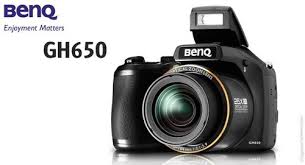
BenQ's GH650
BenQ's new GH650 houses a powerful 26x optical zoom, weighs about 410gram. It has a 16MP CCD sensor, an ISO range up to 6400 and offers full manual controls. On the rear is a 3-inch LCD display that doubles up as the viewfinder with all the controls neatly laid out alongside. It uses AA batteries for power and has a claimed battery life of up to 350 shots.


Other features include built in flash, optical image stabilisation, 1cm macro mode, built-in panorama mode, 720p video recording (with zoom) and various built in filters and effects.

8. 
Asus FonePad
Announced in February 2013 at Mobile World Congress, Asus FonePad also offers voice calling functionality. It has display resolution of 1280x800p and 216ppi pixel density and features an IPS panel. The device is powered by a 1.2GHz Intel Atom processor coupled with 1GB RAM and comes with 8GB onboard storage, with microSD support up to 32GB.


For connectivity, the tablet offers features like 2G, 3G, Wi-Fi, Bluetooth 3.0 and microUSB 2.0. A 3.15MP camera is strapped to the back of Asus FonePad, whereas a 1.2MP unit is placed in front. Running on Android 4.1 (Jelly Bean), this tablet has a 4,270mAh battery that offers talk time of 9 hours. This device has aluminium back, weighs 340gram, measures 10.4mm along the waist.

9. Spice Smart Flo Pace 2
This phone is powered by Android 4.0 (Ice Cream Sandwich) and has screen resolution of 800x480p. This phone is powered by a 1GHz dual-core CPU and offers 512MB RAM. On the back of this phone is a 5MP camera with LED flash, while a VGA snapped is usedin the front. The manufacturer has included 512MB onboard storage and offers up to 32GB microSD card support.

Connectivity features of this phone include 2G, Wi-Fi, Bluetooth 4.0, and microUSB. Spice claims that the 2,100mAh battery of Smart Flo Pace 2 will offer talk time of five hours. The company has preloaded apps like Nimbuzz, WhatsApp and Hoopz in this smartphone.

10. Panasonic 
Toughpad FZ-G1
Toughpad FZ-G1 is powered by Windows 8 operating system and combines the functionality of a personal computer in a rugged package. This device comes with a 10.1-inch screen with 1920x1200p resolution. It supports 10-finger multitouch as well as a digitiser (stylus). It runs on a 2.9GHz Intel i5 processor and packs 4GB RAM (maximum up to 8GB).


The all-new FZ-G1 has HDMI, USB and 3.5mm earphone jacks, all secured under a flap, and the company says that it can add more ports, depending on the needs of clients. This model is IP65 certified (water and dust resistant) and can withstand being dropped from a height of 120cm. Priced at Rs 1.75lakh, this tablet weighs 1.1kg, supports 3G and offers battery life of 8hours.(TOI)

How To Boost Smartphone’s Battery Life

One of the most common issues that gadgets like smartphones and tablets suffer from is poor battery life. Using a few simple tips, apps and accessories in your daily routine can help maximise the battery back-up of your device.

Here are six tips to boost the battery life of your smartphones and tablets.

1. Brightness Level

Display is one of the biggest battery drainers on a phone. Instead of opting for automatic brightness in settings, manually set it to 40-50% in order to conserve battery.


2. Connectivity
Keep the phone and tablet's Wi-Fi, Bluetooth, GPS, NFC and 3G connectivity switched off when not required.

3. Uninstall apps

Various apps run background processes that constantly consume battery. If you are not using a particular app, it's better to uninstall it.
4. Haptic Feedback
The vibrating feedback from the phone every time the touchscreen is used might feel nice, but switching it off saves battery life.

5. Battery Doctor
This free app is available for iOS and Android. It shows which apps are consuming more battery and the remaining battery time of the device. The Android app also lets you do one-touch optimisation of the battery.


6. Carat
Carat is available for both Android as well as iOS and shows how much power each running app is consuming. After a week's usage, it starts giving recommendations on phone usage to improve battery life.

What do you think? have you care about smartphone battery life? if not, the above references you should try.

Google Glass Makes Porn Addiction?

Google Glass Makes Porn Addiction?
Google smart glasses have already been sold to the developers and product mass will likely be in the hands of consumers until next year. Like the smartphone, Google Glass equipped internal memory for storing data, including movies.

Well, the porn industry is reported to have targeted the Google Glass as a new medium to play porn movies. Users can see easily and privately so that it can make addiction.

"These glasses will be the trigger for a new production style. Viewing of television was used, but with these glasses you could almost be in the scene," said Alana Evans, an actress nasty.

"These glasses can be used freely without the help of hands and has the capability of high-resolution displays," he quoted from Mobile Entertainment.

Similar opinion was delivered by Peter Ancworth of a porn company. He considered the Google Glass opens new opportunities in the production of pornography.

"Google Glass opens new opportunities for the production of the film (porn) reality-based," said Anchwort. Where the device is likely to be used to record scenes in the movie nasty.

Anchworth Glass also mentions the use of Google to record spontaneous hot scenes in nightclubs or in places other easily. However, of course this is a privacy-related controversy.
 

Gallery

About Us